Hi!
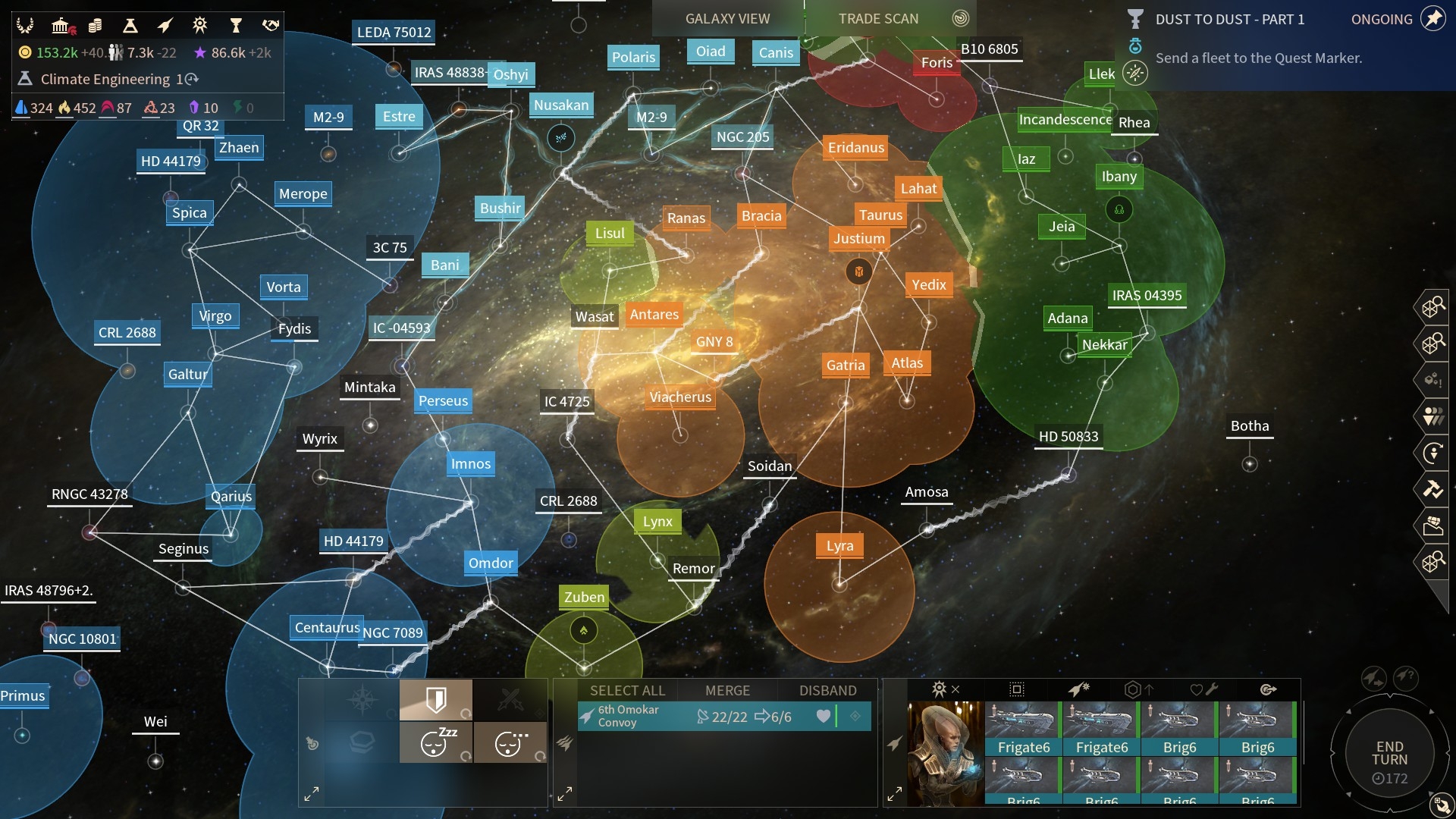
I'm trying to create a shader for a Unity game which would show an area of influence / territory around solar systems much like in Endless Space. Problem is I don't even know where to start. Should I use a surface or post processing shader? How would I set it up? Any help or info would be greatly appreciated!
Area of influence shader
-
Amplify_Borba

- Posts: 1239
- Joined: Mon Jul 24, 2017 9:50 am
Re: Area of influence shader
Hey there, thank you for getting in touch and for your support!
Could you please provide a screenshot of the exact intended effect, so that we may best help you? Thanks!
Could you please provide a screenshot of the exact intended effect, so that we may best help you? Thanks!
Customer Relations at Amplify Creations
Learn more about our offering: Amplify Creations Products
Amplify Shader Editor won the Asset Store Best Tool Award - Thank you for your support!
Learn more about our offering: Amplify Creations Products
Amplify Shader Editor won the Asset Store Best Tool Award - Thank you for your support!
Re: Area of influence shader
Sure thing, here's a shot from Endless space. See the circles around the solar systems, same colors are combined into one territory where they make contact. For starters I would be happy with just 1 color for the player without distorting the circular areas where one player's border meets another's. Thanks for taking the time to help!
-
Amplify_Borba
- Posts: 1239
- Joined: Mon Jul 24, 2017 9:50 am
Re: Area of influence shader
Unfortunately, I'm not quite sure on what to recommend, as even the technique used in the screenshot provided seems to have its limitations.
I could suggest attempting to use stencil or transparency with blending modes, as two means of achieving this effect, although additional scripting outside of the shader would always be required in order to deal with occurrences such as detecting when different areas collide and what to do or how to behave in each possible situation.
Here's an interesting reference: https://mispy.me/unity-alpha-blending-overlap/
I could suggest attempting to use stencil or transparency with blending modes, as two means of achieving this effect, although additional scripting outside of the shader would always be required in order to deal with occurrences such as detecting when different areas collide and what to do or how to behave in each possible situation.
Here's an interesting reference: https://mispy.me/unity-alpha-blending-overlap/
Customer Relations at Amplify Creations
Learn more about our offering: Amplify Creations Products
Amplify Shader Editor won the Asset Store Best Tool Award - Thank you for your support!
Learn more about our offering: Amplify Creations Products
Amplify Shader Editor won the Asset Store Best Tool Award - Thank you for your support!
Re: Area of influence shader
That's exactly what i was looking for! Now that I have a place to start, maybe I can get it working. Thanks a lot!
-
Amplify_Borba
- Posts: 1239
- Joined: Mon Jul 24, 2017 9:50 am
Re: Area of influence shader
I'm glad you found the above information useful, looking forward to see what you create!
Please let me know if you have any further questions, thanks!
Please let me know if you have any further questions, thanks!
Customer Relations at Amplify Creations
Learn more about our offering: Amplify Creations Products
Amplify Shader Editor won the Asset Store Best Tool Award - Thank you for your support!
Learn more about our offering: Amplify Creations Products
Amplify Shader Editor won the Asset Store Best Tool Award - Thank you for your support!