Page 1 of 2
How to add a lightmap?
Posted: Mon Feb 26, 2018 9:36 am
by mossman
Hello,
I don't apply a lightmap properly to a vertext/fragment shader.
I make this simple shader to test. (attatched to this post)
Please any help?
Thanks
Re: How to add a lightmap?
Posted: Mon Feb 26, 2018 11:16 am
by Ricardo Teixeira
mossman wrote:Hello,
I don't apply a lightmap properly to a vertext/fragment shader.
I make this simple shader to test. (attatched to this post)
Please any help?
Thanks
Hello,
Thank you for getting in touch, we would be happy to help.
What's the intended effect?
The Lightmap decode node simply accesses the required per-object information and allows you to derive some information, as we do with custom lighting but, unfortunately, without additional steps/tools, you cannot rewrite Unity lightmaps.
Thanks!
Re: How to add a lightmap?
Posted: Mon Feb 26, 2018 12:55 pm
by mossman
Hello Ricardo,
The inteded effect is apply to my shader de lightmap generated by Unity. I want not rewrite Unity lightmaps.
The achieved effect:
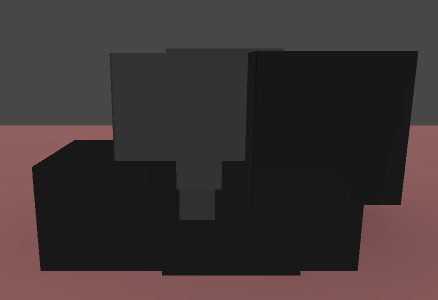
- achieved effect
- achieved.jpg (21.65 KiB) Viewed 18675 times
The desired effect:
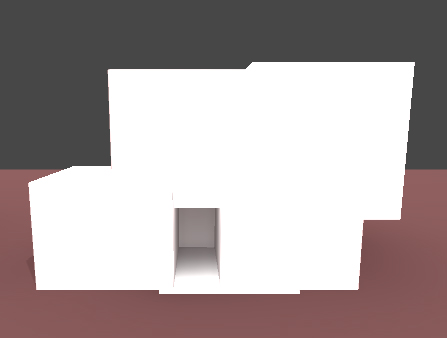
- Desired effect
- desired.jpg (24.11 KiB) Viewed 18675 times
Thanks
Re: How to add a lightmap?
Posted: Mon Feb 26, 2018 1:53 pm
by Ricardo Teixeira
mossman wrote:Hello Ricardo,
The inteded effect is apply to my shader de lightmap generated by Unity. I want not rewrite Unity lightmaps.
The achieved effect:
achieved.jpg
The desired effect:
desired.jpg
Thanks
Using the Unlit shader you shared, the lightmap should be visible immediately after pressing play. Is that not the case?
Thanks!
Re: How to add a lightmap?
Posted: Mon Feb 26, 2018 2:47 pm
by mossman
The result of the shared shader is the achieved effect image. All the surface of the mesh is dark and some part are more dark than others.
If I created a simple unlit shader with a tint color like this material.
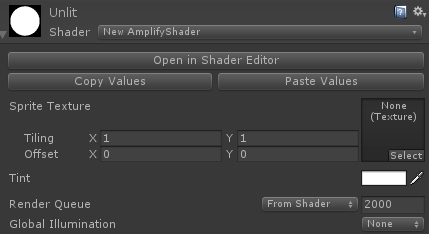
- material.PNG (12.74 KiB) Viewed 18670 times
And then I will bake the lightmap from the Lightning panel with this settings the lightmap doesn't affect the simple unlit shader.
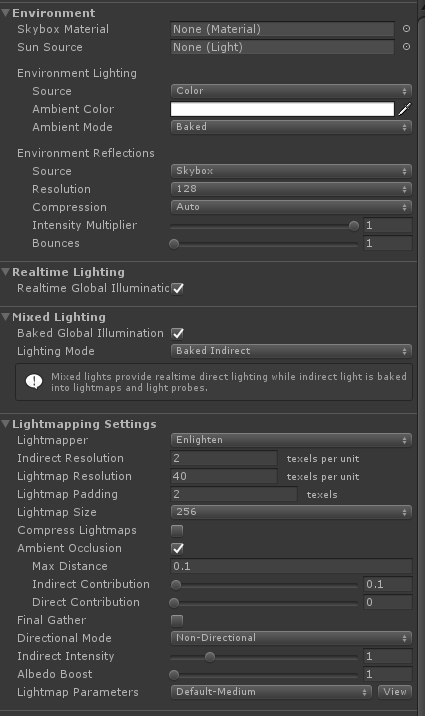
- lightning.PNG (34.79 KiB) Viewed 18670 times
Thanks
Re: How to add a lightmap?
Posted: Tue Feb 27, 2018 2:39 pm
by Ricardo Teixeira
Hello,
Thank you for sharing additional details.
We'll run a few more tests on our side and get back to you as soon as possible.
Apologies for the inconvenience.
Re: How to add a lightmap?
Posted: Tue Feb 27, 2018 8:55 pm
by mossman
Thanks Ricardo!
Re: How to add a lightmap?
Posted: Wed Feb 28, 2018 3:45 pm
by Amplify_Borba
Upon investigating this situation, we came to conclude that this is not an ASE related issue, the lightmap ST calculations must be done manually since the ST variables do not use the termination "_ST", and instead drop the "_" in favor of only "ST", so an automatic ST variable is being used that does not match the right variable.
Please refer to the following screenshot as a working solution.
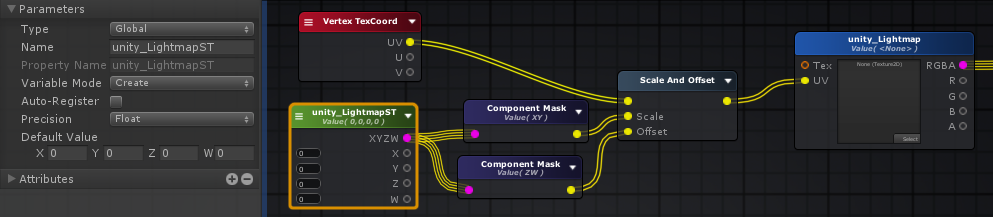
- Lightmap.png (141.34 KiB) Viewed 18637 times
Do note that you must select the proper UV channel in the Vertex Texcoord node!
Please let me know if this helps, thanks!
Re: How to add a lightmap?
Posted: Thu Mar 01, 2018 11:33 am
by mossman
Thanks Ricardo.
I test your solution but now the result is that all cubes with this shader are full white.

- Captura.PNG (6.31 KiB) Viewed 18632 times
I attatched the new version of the shader.
In the Vertex Texcoord node I selected the UV channel 1 and in the Texture Sample node (unity_Lightmap) I selected the UV set 1.
Re: How to add a lightmap?
Posted: Thu Mar 01, 2018 12:35 pm
by Ricardo Teixeira
mossman wrote:Thanks Ricardo.
I test your solution but now the result is that all cubes with this shader are full white.
Captura.PNG
I attatched the new version of the shader.
In the Vertex Texcoord node I selected the UV channel 1 and in the Texture Sample node (unity_Lightmap) I selected the UV set 1.
Hello,
You will have to remove the underscore character from the Texture Sample node property name.

Use
unity_Lightmap instead of
_unity_Lightmap.
Looking forward to your feedback.