Depth writing problem with tessellation and custom lighting

Node-based Shader Editor
Post Reply
DSoM
Posts: 1
Joined: Sat Jun 23, 2018 5:02 pm

Depth writing problem with tessellation and custom lighting

Post by DSoM »

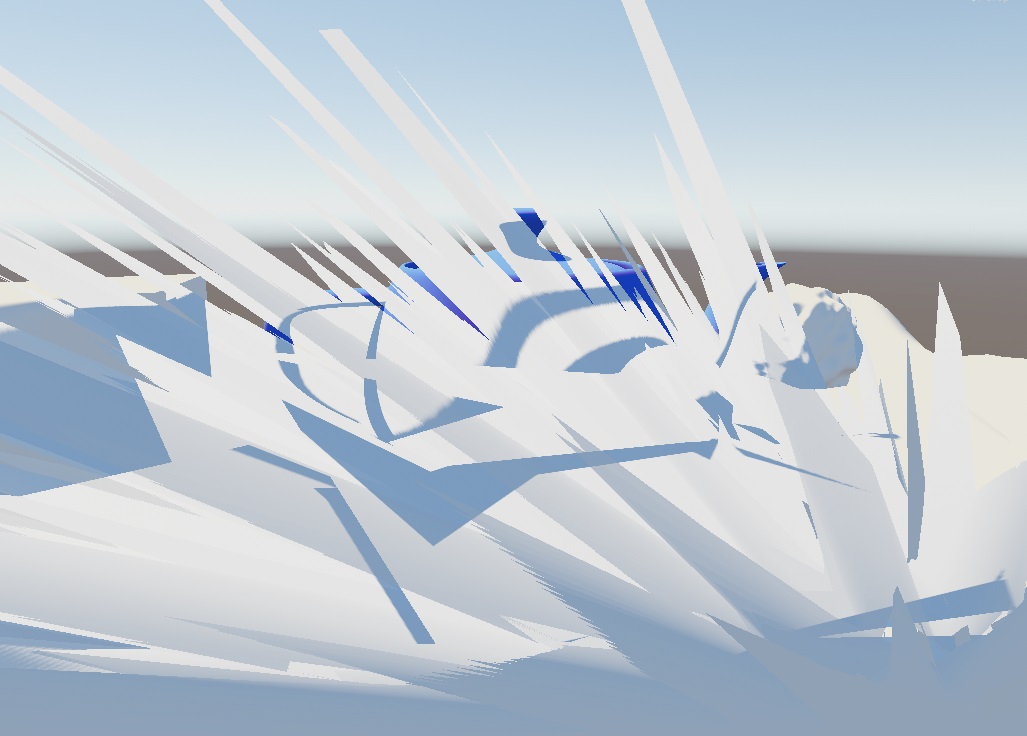
When tessellation is enabled but the light model is set to "Custom Lighting" the tessellation is not applied when writing to the depth buffer, leading to incorrect shadows and other artifacts when either vertex displacement or Phong tessellation is used. When light model is set to "Standard" the tessellation is applied correctly.
I'm using the newest version v.1.5.4.001, although this has been a problem in the previous versions too. Unity version is 2017.3.1f1.

Below is an image showing shadows bleeding through the tessellated and displaced surface.
TessellationDepthProblem.jpg
TessellationDepthProblem.jpg (116.99 KiB) Viewed 1642 times
The shader is pretty much the simplest possible but I attached it in case you need to take a look.
Attachments
TessellationDepthProblem.zip
(2.51 KiB) Downloaded 229 times
User avatar
Ricardo Teixeira
Posts: 954
Joined: Fri Aug 09, 2013 2:26 pm

Re: Depth writing problem with tessellation and custom light

Post by Ricardo Teixeira »

DSoM wrote:When tessellation is enabled but the light model is set to "Custom Lighting" the tessellation is not applied when writing to the depth buffer, leading to incorrect shadows and other artifacts when either vertex displacement or Phong tessellation is used. When light model is set to "Standard" the tessellation is applied correctly.
I'm using the newest version v.1.5.4.001, although this has been a problem in the previous versions too. Unity version is 2017.3.1f1.
Below is an image showing shadows bleeding through the tessellated and displaced surface.
TessellationDepthProblem.jpg
The shader is pretty much the simplest possible but I attached it in case you need to take a look.

Hello,

Our apologies for the delay, we were away for Unite Berlin, we should be back to speed in the next couple of days.

Thank you for reporting the issue, from our tests it seems to only be present when using the Standard Surface Light Node. We've registered the reported problem, we'll get back to you as soon as one of our developer runs a few additional tests.

Thanks!
Sales & Customer Relations at Amplify Creations
Learn more about our offering: Amplify Creations Products
Amplify Shader Editor won the Asset Store Best Tool Award - Thank you for your support!
Post Reply